How to create your own stickers
We've got something really fun to share with you today - stickers! Who doesn't love stickers? But did you know that beyond just being a fun product, stickers are also great for promoting your business and elevating your products? If you like the idea of having custom stickers with your own branding and design, we can help you create them. Die-cut and Kiss-cut stickers There are two types of stickers we offer, die-cut and kiss-cut. Here’s what makes them different: Die-cut Stickers: Die-cut stickers can be printed separately in any shape or size. Because the backing is cut out the same shape as the sticker, this makes them an attractive gift or additional resource to use for everything from branding packages, adding to gift bags, or personalizing equipment and products. Die cut stickers are cut straight through the vinyl and paper backing to fit the exact shape of your design. Ideas for using die-cut stickers: Bonus gifts accompanying products or services Boost brand awareness – can be applied to personal gear or products (computers, snowboards, helmets, binders, cars, you name it…) Add to shipping packages for some extra color and pop Printed with QR codes (see more below about using QR codes with stickers) Extras for subscription boxes, goodie bags, welcome packages… Kiss-cut Stickers: Easy to print, easy to use, and budget-friendly as you can print more stickers on one sheet of paper without the cost of cutting each sticker out individually. We offer up to 30 different shapes on a sheet, any size up to 8.5x11. These can be bound in a product such as a planner or journal, or packaged and sold as a sheet of stickers. On-Demand Kiss Cut Stickers: If you’re looking for an on-demand kiss-cut sticker option, using a pre-cut sheet of stickers is an easy and affordable solution. We can purchase pre-cut sheets with various shapes. There is no minimum number of sheets required if we use pre-cut sticker sheets. In the example you see here, we printed 3” round stickers using a 3” round pre-cut sheet of labels. There are a variety of shapes and size available such as butterflies, starburst, and round stickers. So if you’re looking for fun shapes and other options, using pre-cut label stock can be a very affordable option. Custom Kiss Cut Stickers: Up to 30 shapes per sheet, minimum order of 150 sheets. Pre-cut Sticker Sheets: No minimum, contact us for more information about shapes available. Ideas for using kiss-cut stickers: Upsell items for daily planners, workbooks, coloring books… Personalize undated planners with dates, times, categories, etc. Add to tabs for labeling and organization Extras for workbooks, journals or coloring books Activity books for children Stickers with QR Codes Stickers and QR codes are a great combination – and one you can easily use for everything from promotions to marketing to adding value to your products and services. See the example at right to see how versatile stickers can be for combining design with QR codes to create an easy way to share information or a call-to-action, increase brand awareness, and support audience and business growth. There are many free online sites where you can get a QR Code. All you have to do is add the QR code to your sticker (or postcard or document) and you can easily link your offline customer to your website, social media, or other online platforms. How to print your own die-cut or kiss-cut stickers If you like the idea of creating stickers, we’re here to help! For ideas and inspiration, check out the videos we’ve shared on our website. To receive free quotes, or share questions and ideas, email [email protected]. p.s. This information is also available on our website Expert Guides page. You can access and download it also by clicking HERE.
Read More →
How to customize your packing slips
When you place an order and open your package, what is the first thing you see? Often, it’s the packing slip inside! This simple piece of paper is often overlooked, but can be customized to make it a useful, interesting, and value-adding part of your customer’s experience. Think of the packing slip as a valuable piece of real estate perfect for sharing information like: A greeting or message that makes a personal connection Your logo for brand awareness Return policies that eliminate confusion about time frames or refunds Business address and contact information (PLEASE NOTE: Prices are NOT included on our packing slips.) Here at Vervante, we provide the ability to customize packing slips – and you can even print out a sample to see how it will look from your customer’s perspective. Here’s how to get started First, log into your Vervante author account, then select “Customize My Packing Slip” on your Author Dashboard. From this page, you have options to customize in the following ways: Add a logo Input your business address Add a personal greeting, instructions, return policy, or other message Include a custom return address if needed When you make a change to your packing slip, be sure to click on the “UPDATE” button at the bottom of the page to save your changes. Then you can click on the “PRINT SAMPLE” button to print out a copy and proofread your changes. Too often, the value of these small slips of paper that come with packages are overlooked. We hope this gave you some great ideas and useful info for customizing your packing slips. And if you have any questions, please let us know. We're here to help at [email protected].
Read More →
How to set a price for your planner
You’ve created the perfect planner, now the big question is how much to charge for it? It’s like a scary math problem where the answer isn’t always clear. Price it too high and no one will buy. Price it too low and you devalue your work and your profits. Finding the right price doesn’t have to feel like a guessing game, though, especially if you follow these steps. (btw, these work for any product – books, journals, card decks, etc.) STEP #1: Research similar products and see what they are charging. This will give you a starting price range and an idea of what customers are willing to pay. A note about pricing: If your community is relatively small and you’re planning on printing a small batch, for example less than 500 planners, don’t compare your product and price point to planner industry leaders Emily Ley or Erin Condren who both print thousands at a time, making their costs significantly lower. STEP #2: Calculate your costs including printing, production, and fulfillment to get a break-even baseline. If you plan to sell on Amazon, remember to add in 15% commission for Amazon. If you sell from your own site, include fees such as credit card processing and other merchant fees. STEP #3: Consider the value your book, planner or product is offering to your customer. Will this product help them save time, money, stress? If you deliver a lot of value, this in turn raises the value of your product and the price you can charge. STEP #4: Set a price that feels right to you. If you think you’re charging too little, then you’ll feel resentful and that will come through. If you think you are charging too much, you might feel nervous, unsure or scared to put it out there. STEP #5: Poll beta testers. Reach out to friends, colleagues, anyone who might fit your target customer demographic and ask for feedback. A soft-launch is a great way to test the water. Pre-orders are another great way to test your product, price, and even help determine how many to print. The other added benefit of pre-orders is that it helps offset the cost of the print run. STEP #6: Relax that this isn’t set in stone. Pricing can be nerve-racking, we know, but you can always adjust. You might start out with an introductory price to test the waters and then adjust it to fit demand. Coupon codes, special packaged deals, and other similar methods can be used until you’ve got it just right. STEP #7: Add value to support your price: Make the price you set a no-brainer by adding so much value that your customer is excited to buy! Create packages to make it unique and different than anything else – and add value with extra products that complement it. For example, for daily planners you could include extras like pens, clips, bookmarks, notepads, stickers, card decks, or even experiences like an introductory coaching session or limited-time membership in a mastermind or online program. Adding a little something extra like this will elevate your planner's value in your customer's eyes. Yes, there might be similar products with lower prices (that are most likely bulk-produced in China), but you have the ability with self-publishing services to create something unique, elevate your customer's experience, and make yours the choice they want.
Read More →
The beauty of clear packaging: Using clear tuck boxes
Great packaging for any product should always have one thing in common – making the product look great! And there’s nothing better at letting a product’s value shine through than clear tuck boxes. If you’re looking for a packaging option that is attractive, versatile, and works for a wide variety of products and needs, clear tuck boxes are it! Here at Vervante, we offer clear tuck boxes in different sizes that work for a variety of products including card decks and sets of greeting cards. Clear tuck boxes offer so much versatility, letting everything inside shine through. Available on demand, no minimum order quantity required Can add attractive packing materials inside like colored tissue, confetti, shredded crinkle-cut papers, jewels, and other treats that catch the eye. Sturdy and easy to use Adds value to deck cards or set of greeting cards If you want packaging that gives you some extra pizzazz for that first impression moment, clear tuck boxes will definitely deliver. If you’d like to inquire about clear tuck boxes for any of your products, we’re here to answer questions or provide quotes at [email protected].
Read More →
How to make your products even better
No matter what type of product you have, there are always ways you can make it better. Even just the smallest little extra can be the key that inspires customers to hit the "buy" button and choose your product over the rest. We've rounded up a few ideas below for popular products that you can easily add for your products. Card Decks Custom-designed card decks are fun, valuable, easy to use, and very memorable. A great way to uplevel your card deck presentation is by creating custom packaging. Many people provide bags for card decks that we can package them in, but did you know that we can also print custom-designed boxes and packaging for cards? Check out our expert guide, "How to Create Custom Printed Card Decks," on our Expert Guide page to learn more about card decks and the packaging options we offer. Spiral or Wire-o Binding Journals, planners, coloring books, and workbooks are just a few examples of products that increase in both function and value when you have the ability to lay them flat. When it comes to spiral and wire-o binding, we have a lot of options. Plus, we can help you list and sell spiral-bound products on Amazon - something most other print-on-demand publishers don't offer. Spiral binding can be used for: Soft Covers Poly Paper (water and tear resistant) Hard covers Laminated Soft Covers 2-Ply Board Covers We offer a range of colors for spiral and wire-o that have the power to deliver a high-impact first impression, as well as a reliable binding option for your customer. Your product, already packed with value, becomes awe-inspiring and unique with the simple addition of a color or metal option. Plastic spiral binding (50+ colors) Metal spiral (3+ colors) Metal wire-o (7 colors) For more information about using spiral or wire-o binding for books, journals, planners, coloring books and more, see "How to Sell Spiral Bound Products on Amazon" on our blog. Custom Labels or Custom Printed Boxes Custom labels are an excellent way to maximize your brand, logo, or message. Take advantage of this valuable – and often overlooked – brand-boosting opportunity by creating a fullcolor label that features your unique design. Custom labels are a simple, yet vastly effective way of dressing your letter and packages for success, and making sure that your brand is the one that stands out. A custom printed box stands out from the crowd. Add your message to the outside and inside of the box and wow your customers! For more information about custom printed boxes, watch the video "Custom Printed Boxes" on our video vault page on the website. Printed Newsletters Direct mail pieces such as newsletters are a great way to connect to your readers at a deeper, more emotional level. Sending them in a standard white or brown envelope is great, but sending them in a clear mailing envelope is a great way to let your newsletter shine through and wow your readers before they even start reading them. Check out our expert guide, "The Secret Weapon to Successful Newsletters," on our Expert Guide page to learn more about creating, mailing and packaging printed newsletters. For more product and packaging ideas that will help your products stand out from the crowd, be sure to watch the videos in our website Video Vault. We are also happy to provide free quotes and answer questions about any of the products mentioned here,
Read More →
The ultimate checklist for creating print-ready files
Free Guide: The Ultimate Checklist for Creating Print-Ready Files If you're ready to send in your print files, but not sure exactly how they need to be formatted - this expert guide is for you. Print file preparation is extremely important, so even if you're not ready to start printing just yet, you'll want to download and save this guide to help you when you're ready. This free guide provides checklists for preparing print files for: Perfect bound books Card decks Spiral-bound softcover Hard-cover spiral / Wire-o bound Kiss-cut stickers Saddle-stitch softcover Turned-edge binders Board covers, Laminated covers & Poly paper covers Hard cover casebound books We also have a full article on the blog discussing the importance of proper print-file preparation and details that will help here: How to prepare your files for printing. This free guide - and many others like it - can be viewed and downloaded from our Expert Guides page on the Vervante website. We're here for questions, free quotes, and any self-publishing assistance you might need at [email protected].
Read More →
How to add great photos to your Amazon listing
We're very excited to share with you today a new expert guides now available on our website Expert Guides page. It's free, easy to download and print, and we can't wait for you to see it. New Free Guide: Amazon Images & "Peek Inside" Feature This expert guide shares how to provide images for your listing, and how to add a popular feature that shoppers love. We can use single images of a book cover, or we can use designed images (like the one here with multiple products). We can also help you set up something similar to Amazon's popular "Look Inside" feature so customers can get a taste of the book or product you're offering for sale. We offer this service for both Amazon and Vervante Bookstore listings, called "Peek Inside." You're invited to check out our new guide, recently posted to the Expert Guides page on our website, for details. If you'd like to set this up for your listings in Amazon or the Vervante Bookstore, just following the easy direction in the user guide. And we'll be here at [email protected] if you need any help. You can view and download this guide, and many others, on our Expert Guides page on the website.
Read More →
How to sell spiral-bound products on Amazon
Spiral binding is popular for many types of books because it makes them so much easier to use. Planners, journals, workbooks, cookbooks, and coloring books are often so much easier to read and write in with spiral binding as it allows them to open fully and lay flat. Picture a coloring book or planner that is perfect bound, like a novel, next to one with spiral binding that lays flat, and you’ll see why spiral binding is often the better choice. Did you know, however, that spiral binding on-demand is rare in the publishing world? That’s why we’re happy to share with you that we offer on demand spiral binding and the ability to sell your spiral-bound product on Amazon and anywhere else you want too. Spiral binding options Spiral binding is sometimes also called spiral coil, plastic coil or coil binding. Spiral binding is durable, won't break or bend under pressure, and comes in more than 50 different colors allowing you to customize your book by matching the binding to the cover for a unique and attractive finish. Spiral is also available in metal. This is a very popular option over metal wire-o binding. The reason is because it is a continuous metal spiral so the binding cannot come apart. Sometimes with wire-o binding, the loops can be pulled apart or they inadvertently don’t get clamped together properly. We love metal spiral binding because this doesn’t happen. Metal spiral is available in three colors: silver, black and white. We stock silver metal spiral. Black and white can be special ordered. Plastic spiral is available in more than 50 colors. We stock black and white. Other colors can be special ordered. Both Metal and Plastic spiral binding are available on-demand or for bulk orders. Wire-o binding A similar binding option for books is wire-o binding, also known as twin loop, double-loop, or wire binding. It also allows a book to lay flat, comes in a variety of colors, and is a popular choice for journals and planners. The minimum order quantity for wire-o binding is 25. Click on these links to see the color options for plastic spiral, metal spiral, and metal wire-o binding: Metal Wire-o Metal Spiral Plastic Spiral Using spiral or wire-o binding with custom covers We offer both soft and hard cover options with spiral and wire-o binding. Spiral and wire-o binding can be used with all of our cover options: Soft covers Poly paper covers 2-ply board covers Hard covers If you want the best of both worlds – a spiral bound book that lays flat, but has a spine like a traditional book that looks good on a shelf – we offer a unique wrap-around cover that provides everything you want. Spiral binding videos Be sure to watch the videos in our website Video Vault to see multiple highlights of products with spiral binding, wire-o binding, and all of the customizations we mentioned here. We offer samples for spiral bound products to help you see and feel how it might function with your own products. You can see our sample offerings page here. We are also happy to provide free quotes for spiral-bound products, or answer questions at [email protected].
Read More →
Print on demand (POD) vs. Bulk Printing
We get this question a lot: “What’s better, print-on-demand or bulk orders?” The right answer depends on a number of things – your business model, your budget, the type of product, and your customers to name a few. Here’s how each one works and the benefits they offer. Print-on-demand (POD) To put it simply, printing-on-demand is when we print only the amount ordered, at the time we receive the order. You pay only the cost of printing plus postage for shipping. While other publishing companies often require costly minimum orders in large numbers, here at Vervante we offer POD print-on-demand services for any size order, printing only when you need it, to meet your budget and demand. How print-on-demand works An order is placed for a book or other product. We print the exact amount ordered. The order is then shipped to the person who ordered it (either you or your customer). Benefits of print-on-demand Get only the amount you want, when you want it. You sell the product from your site, your Etsy store, or we can list it for you on Amazon. When we receive an order, we’ll print and ship it to the buyer. Print-on-demand products NOTE: Products with softcovers, poly paper covers, plastic spiral binding, metal spiral binding, perfect binding, and saddle-stitch binding are all available on demand. Here is a quick list of products we can print on demand: Paperback books Spiral bound books Coloring books Children’s books Saddle-stitched books Planners Journals Workbooks Binders Notepads Calendars Card decks Greeting cards Posters Post cards Certificates Newsletters Bookmarks Bulk printing Placing orders for large amounts of books or products to be printed at once can be a benefit for businesses that anticipate large amounts of orders - as well as lowering your printing costs. We can print in bulk and send to you, or we can store them in our warehouse to use for future orders from your account. How to get bulk pricing quotes When you request a quote for printing costs, we always provide a print-on-demand price, but you can also request bulk costs as well. The more you print, the lower the price per product. How to use bulk printing Once you’ve received your quotes and are ready to proceed, please email [email protected] to let us know you would like to place an order. Contact our customer service team to make the order and they will set it up so a discount will apply when you place the order. You can choose to have your order stored in our warehouse for free, or shipped directly to you. You can then send us individual orders for fulfillment. We’ll pull your product from your stored inventory in our warehouse and drop-ship it directly to your customer. Storing bulk orders in our warehouse Even if you don’t anticipate all of your printed books selling right away, you can still take advantage of the lower pricing by placing a bulk order and storing it in our warehouse. Bulk orders can be printed and stored in our secure warehouse, ready to be pulled and drop-shipped when you need them. Tracking your inventory When a bulk order is placed, if you choose to store your order in our warehouse, you will see a category on your Vervante Author Account Home Page that says “Inventory Report.” This is where you can find an accounting of how many products remain in inventory. You will need to track your inventory and let us know when and if you would like another bulk order printed. We hope this helps clarify the differences and benefits for both POD and bulk printing when it comes to books and many other products. If you have any questions about using POD or bulk printing for your current products, or new ones, we’re here to help. Just email us at [email protected].
Read More →
Special touches for daily planners and journals
If you love the idea of creating a daily planner, hopefully our articles earlier this year outlining the steps and strategies for a smooth process helped inspire and motivate you. We shared a step-by-step guide for creating a planner from A to Z, stressing the importance of understanding the timelines and planning ahead. We followed up with a detailed look at deciding how your planner will look and function with design and formatting tutorials you’ll want to bookmark. Once you’ve set your plan and started designing your planner, the next steps are really fun – deciding on the details, all those little extras that can really make your product shine. Creating a Daily Planner: Details, Extras & Add-Ons It’s all the little extras that can make a planner extra special. We offer a lot of great options that you can pick and choose from to make your planner uniquely your own, and make sure it fits the audience you’re building it for. The best place to go to learn more about what we offer is the Video Vault page on our website. We’ve recently adding a handful of new videos in addition to what is already there, and they are all filled with real-life, full-color demos of our products and all the extras showing how the look and function to help you make your decisions. Here’s what you can check out now on the site: Planner & Journal Add-On Options: Extras that make your product shine such as foil stamping, metal corners, tabs, kiss-cut stickers, paper pockets, bookmarks, and elastic straps. Hardcover Journals: Multiple options for journals and books: Faux leather, linen or printed covers, foil stamping, soft or hard covers, ribbon markers, elastic straps. Concealed Hardcover Wire-o: Yes, you can have it all! A hardcover, wire-o planner, journal or book WITH a spine! And extra touches including printed end sheets and a lux soft-touch laminated cover. Our Annual Customizable Planner: This is a great detailed dive into how we create our popular annual planners that many of our customers use as a starting point for creating their own. See features and budget-friendly alternatives including wire binding in multiple colors, printed tab dividers, paper pockets, and more. Faux Leather and Linen Covers: In addition to cover alternatives, this video highlights extras including metal corners, ribbon markers and elastic straps. Poly Paper Cover: A lightweight and durable option for planners, and other types of journals or workbooks, poly paper covers are durable, waterproof, tear-proof, washable, fade-resistant, and recyclable. Plastic Snap-in Sheets: Add these to wire-o bound planners, they add functionality and can be written on with a dry-erase marker. Did one of these journals or planners catch your eye? In addition to seeing our products in our videos, you can also order samples of various products here.
Read More →
Poly Paper Covers
Looking for a lightweight and durable option for daily planners, journals, notebooks, workbooks, menus, etc? A Poly Paper Cover might be just what you need. Be sure to check out one of our newest videos on the Vervante Video Vault page highlighting the versatility of Poly Paper covers. This synthetic paper is durable, waterproof, tear-proof, washable, fade-resistant, and recyclable. These can be printed on both sides, can be used with spiral binding or wire-o, and are a great budget-friendly choice if you need something more durable than plain paper but not quite as thick as hard covers. Poly Paper covers are very popular for daily planner covers, journals, reference documents, menus, and much more - Click HERE to see more details and order one of our 2021 Daily Planners with a bright and fun Poly Paper Cover. To learn more about this new cover option, check out the video on our website, or reach out to us at [email protected].
Read More →
Self publishing Get Started Guide
One of the most important steps for any project is the first step. Decades of experience in the publishing industry has taught us that just the act of getting started and gathering your thoughts and ideas can be one of the hardest things you do. So for anyone who has a vision for a new product, and needs a little guidance for what steps to start with, we’re gathered these tips for you. Define your product Gathering your ideas is the first step toward turning an idea into the real deal. A good place to start is to look at other similar products like the one you are about to create. Determine what you like about them such as size, number of pages, fonts, colors, type of binding, and any other special treatments. Then take those ideas and incorporate them as you plan out the details for your product. Watch product videos A great place to get ideas and see how things look in real life is by watching the videos on the Vervante Video Vault web page. The videos spotlight a variety of products close-up and in action, narrated by our CEO, and showing ways to create and elevate your products. Currently there are videos for binders, planners, journals, card decks, calendars, custom printed boxes, greeting cards, stickers, book cover treatments, and more. We’re always adding something new, so be sure to check back often for lots of ideas and inspiration. Find useful guides on our blog Our blog is absolutely packed full of information, updates and how-to’s for all of the products and services we offer. Here are just a few examples that can prove very valuable for illuminating and guiding you through your project: How to Sell on Amazon, Etsy & your own website all at once Step-by-step guide for creating custom card decks How to use ISBN, LCCN, and Copyright How to create a 2022 daily planner How to prepare your files for printing How to create customized journals Steps for setting up pre-sale offers How to set up shipping & postage Order samples If you’re unsure how some thing will look in person, we offer samples that can be ordered to try out. We have a Samples Page on our website filled with products you can order to help you make your final decision. Our newest and most popular sample is the Paper Sample Notepad that includes eight of our most popular paper options. We also offer samples for books, book binding, calendars, card decks and greeting cards, posters, binders, printed boxes, pocket planners, newsletters, notepads, certificates and more. Get a free quote Finally, did you know that you can get a free quote estimating your printing costs before you are ready to print? This will help you plan for budgeting and costs as you design your product. All you need to know to get a quote are general specifications. Here are a few examples: Books: Size of book, number of pages, hardcover or soft, binding type, color or b&w Card decks or greeting cards: Size of cards, number of cards, color or b&w, packaging Planners or journals: Size of planner, number of pages, page size, tabs, covers, binding, etc. To request a quote, go to the Vervante website home page and click on “Get a Quote” at the top, right of the page. Fill out the required information and we will send you an email response with the quote information. We hope this helps you to avoid that “I’m not sure where to start” feeling. And we’re excited to help you create and share books, planners and products that you’ve always dreamed of. For questions or ideas, you can always reach us at [email protected].
Read More →
Canva bleed and crop mark tutorial
Many of our clients use the online graphic design program called “Canva” to create planners, journals, and other products. Once your designs are ready for printing, it’s important to note that margins, bleed and crop marks must be applied for us to print. If you are using Canva for your next project, here is how to apply bleed and crop marks. Bleed Bleed helps to avoid having unsightly white gaps when you want your design to print to the edge of the paper. It is for a design intended to have color elements all the way to the edge of the page. Click on “File” Select “Show print bleed.” A border of broken lines will appear close to the edges of your design. This margin is fixed and cannot be adjusted. If you see white gaps around the design edges, adjust your background and design elements to cover the white spaces. Crop Marks Crop marks show the printer where to trim (or cut) the paper or card for your product. The size for crop marks is fixed and cannot be adjusted. The time to add crop marks is when you’re ready to download your design and send it for printing. After you add bleed to your design, click the Download button on the toolbar. On the File Type dropdown menu, select PDF Print. Click the box next to “Crop marks and bleed.” Click Download. For more details and information about preparing your files for print, be sure to refer to this article “How to Prepare Your Files for Printing” on our blog. Why are bleed and crop marks important? Missing bleed and crop marks seem to be the most popular reason for rejected print files. If your PDF has edge-to-edge printing, then you need bleed. This means the image should be slightly larger than the finished page size so that when we trim to the crop marks, we will cut through the image so that the printing actually prints edge to edge. Without bleed, your page/cover/document will have a white border all of the way around and the color will not print to the edge of the sheet. Print file preparation is extremely important, so even if you're not ready to start printing just yet, be sure to save these instructions to help you down the road.
Read More →
Linen cover? Faux leather? Planner choices to fit everyone
A few weeks ago we shared a step-by-step guide for creating a daily planner. Dates and deadlines for creating one for the year 2022 were provided, but our tips will work for any date, and even undated planners. Feedback was great, so we wanted to dig in a little deeper to discuss the steps in detail. Step 1 was understanding your timeline. For instance, if you are planning to launch a planner for 2022, the final date to submit your files for printing is Oct 15, 2021. Moving on, today we wanted to talk about the next important steps – deciding how your planner will look and function. A really great planner should provide the perfect mix of attractiveness and functionality. Your customers want it to look good and help them achieve their goals, so this step is very important. Find that sweet spot and you’ll create fans who keep coming back for more. Choose Your Topic There is an unlimited potential pool of ideas for daily planners. The sky is the limit when it comes to topics and types. Ask yourself: Who is your audience and what type of planner would best serve their needs? Next, you’ll want to decide on the size and specs for your planner, starting with cover and binding. We’ll outline some options below, but please also check out the Vervante Video Vault where we highlight many different options for planners, including size, binding, and types and treatments for covers. Binding options Metal wire-o Metal spiral Plastic spiral Custom printed 3-ring binders (any page size) Case binding Punched for Disc Binding Concealed wire-o Cover options Hardcovers (for wire-o, spiral or case binding): For a 12-month planner we recommend a sturdy cover that will hold up to daily use. Our most popular cover is a hardcover with either a printed design, faux/vegan leather, or linen treatment. We have color charts on our site for faux/vegan leather, linen, and customer favorite LaCreme vegan leather that feels like suede. Laminated Covers: Another durable cover, and a great option for a 12-month planner, is our laminated covers. These can be wire-o, spiral bound or punched for disc binding. Board Covers: These are a 2-ply softcover that creates a board-like cover option. These are sturdy and will hold up to daily use for 12 months. Softcovers: If you have a short term planner such as a 30-60-90 day planner, a softcover would be fine. We also offer a poly plastic overlay to help protect the covers. Foil Stamping: We offer a wide variety of foil stamp colors that you can see here. We can foil stamp hardcovers (printed, faux leather and linen), board covers, laminated covers, and softcovers. Metal Corners: These are a popular add-on for hardcovers. They are available in gold metal. Elastic Strap: These are a very nice addition to a hardcover planner or journal. Ribbon Marker: We can add a ribbon marker (or two, or three, or more) to your casebound planner or journal. Helpful website links You can see all of the color choices and other options on our website, here: Metallic Foil Color Choices Faux Vegan Leather Cover Choices LaCreme Faux/Vegan Leather Options Pearl Linen Cover Choices Print specs for covers (downloads) Samples Design & Functionality Design matters. If you want to do it yourself, you can use programs like Canva or InDesign to create your planner pages. Or you can hire a professional graphic designer. Just make sure your planner design is both beautiful and functional for a high-quality look and feel. Be sure to watch our videos about creating planners and add-on options on the Vervante Video Vault page. Are you ready to create and sell your own daily planner? We can help you make that dream come true! Here at Vervante, we believe in living an intentional, productive, and beautiful life – and we’re proud to help people like you make the world a better place. Email us at [email protected] or schedule a call using the link on our Contact page for questions, quotes, and any help you need.
Read More →
Step by step guide for creating a custom card deck
Card decks are a very popular product, with many Vervante customers creating their own versions to use for so many fun and valuable ideas like tarot, recipes, fitness, mantras, study guides, writing prompts, daily prayers, and more. We know you love card decks. We’ve shared lots of ideas in the past for creating and using card decks, and now want to talk about the step-by-step process to follow for creating a card deck of your own. Step #1: Card size and specs First, you need to decide your card’s physical specifications. When we say custom, we mean it, and offer lots of variations you can use to create the perfect card deck for your purposes. We can print card decks: In any size Any number of cards in each deck Variety of paper options With square or rounded corners Each card can have unique designs on either side Color or black & white (or both) Step #2: Get a Quote Use the “Get a Quote” link on our website home page or send an email to [email protected] sharing the specs for your new card deck to receive a free quote for printing and production costs. If you send an email, please include the following information: Size of cards Square corners or rounded corners How many cards in the deck Color, black-and-white, or a combination of both Step #3: Design Now it’s time to create your card deck masterpiece. You can hire a professional graphic designer, or you can do it yourself using a program like Canva. If you need a template to work with, we offer free downloads from our Templates page for card decks and tuck boxes. (Be sure to click on the small PDF icon on the list to access the template.) Step #4: Sending print files Once your design files are ready, you can upload the print-ready PDF to your Vervante author account. For card decks, we need one PDF for the entire card deck. For example, if your card deck consists of 40 cards, we need an 80-page PDF. Once you have your print files ready you can upload these from the Send Files link via your Vervante Author Dashboard. Our team will download the files, review your specification document and let you know if we have any questions. If there are no issues with your files, we will add the card decks to your Vervante Author Account. You will receive an email notifying you that your card decks are now available for ordering. We have an expert guide detailing these steps and more, “How to Create Custom-printed Card Decks,” on the Vervante website Expert Guide page. You can also watch videos with card deck ideas and instructions on the Vervante Video Vault page. Step #5: Packaging & Presentation Great card decks deserve great packaging. We can package and present your custom card decks in unique ways that increase their value in the eyes of customers. Packaging ideas: Custom printed tuck box Custom printed rigid 2-piece box Plastic “pop up” box Cello sleeve Ring Drawstring bag Metal tin Plastic envelope The custom printed boxes are available in minimum order quantities of 250. You can send us drawstring bags, metal tins or other creative containers for card deck presentation and storage. For an even more creative presentation, you can send us items such as crystals or stones that can be packaged and shipped to customers with the cards. Need to include instructions or a guidebook with your card deck? We can do that too. We can print small perfect-bound or accordion-folding instructional booklets the same size as your deck to fit in the same packaging. If this has inspired you to create your own unique card deck, we're here to answer any questions and help you get started right away. Just email us at [email protected] or schedule a phone call with our publishing experts by clicking HERE.
Read More →
How to use ISBN, LCCN and Copyright
When it comes to the details of publishing books, planners, card decks and other products, some of the most frequent questions we hear are about things like ISBNs, LCCNs, and copyrighting. We know, all those acronyms can get confusing! So we put together this quick guide for understanding what they are and how they apply to your products to help you with this important part of your next publishing project. ISBN: An ISBN number (International Standard Book Number) is a unique identifier that is assigned to your book or product. The barcode is required to sell products in a physical bookstore. If you are planning to sell your product on your site and on Amazon, you do not need to print or include a barcode on your product. The ISBN is only required for creating the listing on Amazon. You can easily purchase ISBNs through your Vervante author account or directly from Bowker.com. When you purchase an ISBN from us and we list the product on Amazon, Vervante must be listed as the publisher. You are welcome to purchase and supply your own ISBN purchased from Bowker. Including the price in your barcode or printing the price on your book/product is not required. In fact, we don’t recommend printing a price on your book. This gives you flexibility to change the price, if necessary, without effecting the printed product. LCCN: Libraries use the Library of Congress database to stay up-to-date on available titles. You can make it easier for libraries to purchase your book by registering for a Library of Congress Control Number (LCCN) - a unique identification number that the Library of Congress assigns and uses for cataloging and other book-processing activities. You need an LCCN if you have a book that you would like to be carried by a library. You can file for an LCCN online, or Vervante can provide that service for you. Click on the link that says "LCCN Assignment" on your Vervante author home page. COPYRIGHT: We are often asked if its necessary to copyright books and information products. Technically, under U.S. copyright law, your self-published work is protected as soon as you put the pen to paper. Official Copyright Registration, however, gives you a higher level of security when it comes to protecting your work. When you register your work with the U.S. Copyright office, you create a public record of your authorship and are officially recognized as the copyright holder in a court of law. (You can find more details about copyright requirements and protections here.) Filing for copyright is not a requirement to publish with Vervante but we recommend this step to protect your work. You can register for a copyright yourself or we are happy to provide this service for you. Just click on the "Copyright Registration" link on your Vervante author home page to learn more. You do not need to wait for the application to the US Copyright Office to be accepted in order to include the copyright protected statement on your document. COPYRIGHT PAGE: This is not a requirement, however it is a commonly-used page in your product to collect and provide elements such as: full title, subtitle, author’s name, editor, illustrator, etc., published date, ISBN, LCCN, date of publication and copyright. The copyright statement can be as simple as: © 2021 Your Name All Rights Reserved Or you can add additional content such as this: Copyright © 2021 by Author’s Name All rights reserved. This book or any portion thereof may not be reproduced or used in any manner whatsoever without the express written permission of the publisher except for the use of brief quotations in a book review. Printed in the United States of America First Printing, 2021 ISBN 0-9000000-0-0 Your Publishing Name* 123 Main Street City, State 00000 www.YourWebsite.com * As a Vervante customer, you are welcome to list Vervante as your publisher, it is not required. Our products are printed and distributed from our printing and distribution facility in Utah, all products proudly made in the USA. If you use Vervante as your publishing name, you can use the following address: Vervante 224 South Main St #202 Springville, Utah 84663 For more information about copyrights, check out these articles: Copyright Registration FAQs How to Copyright Your Book The biggest thing to remember is that we provide services for all of the above. Just log into your author account home page and click on the links under the "Product Labeling and Professional Service" section to get started. Or send us an email at [email protected], we're here to help!
Read More →
Step by Step How to Create a Daily Planner
If you’ve been thinking about creating a daily planner, the right time to start is right now. Over the last few years here at Vervante, we’ve helped hundreds of clients create and sell the daily planners of their dreams. We want you to have a successful experience, too, so this year we are committed to providing step-by-step guidance for planning, creating and launching daily planners for any year - or even undated planners too! Planning ahead is the key. Understanding the steps it takes to create a planner will help avoid last-minute stress if you’re launching for the new year. So for today, we wanted to share with you a simple 7-step overview of the process with suggested timelines for creating a daily planner. Step 1 | Know Your Timeline If you are creating a planner for a specific year and would like your planner to ship and arrive by a specific time, be sure to find out what the deadline is with your printer. Planning ahead for steps in the process such as design turnaround, ordering samples, beta testing, and print times is also essential to know. Step 2 | Select Your Topic, Size & Specs The sky is the limit when it comes to topics and types. Start by asking yourself: Who is your audience and what type of planner would best serve their needs? The size and specs for your planner are the foundation of what you’re building. For ideas and inspirations, check out the Vervante Video Vault. Step 3 | Time to Design Design matters. If you want to do it yourself, you can use programs like Canva or InDesign to create your planner pages. Or you can hire a professional graphic designer. Just make sure your planner design is both beautiful and functional for a high-quality look and feel. Step 4 | Decide on the Details: Extras & Add-Ons It’s all the little extras that can make a planner extra special. Check out the Vervante Video Vault showcasing features that can add both fun and functionality, such as colors of wire-o and spiral binding, metal corners, elastic straps, stickers, and more. If your planner is intended to be used for more than 90 days, we encourage you to use a board cover or hardcover. A printed softcover is great, however, with daily use it probably won’t hold up. Cover options Board covers Hardcovers can be printed, faux/vegan leather or linen. The faux/vegan and linen options are generally also foil stamped. We have color options on our site HERE. Laminated softcovers Softcovers or softcovers with poly overlays Binding options Metal wire-o binding Metal spiral binding Plastic spiral binding Casebound hardcover Punched for disc binding Step 5 | Pricing & Production Use the free quote tool on our website home page for free printing quotes and information. We provide a wide range of cost-effective, customized options for printing daily planners so you can get what you need, when you need it, and exactly how you want. Step 6 | Presentation A beautiful planner deserves beautiful packaging. If you want to make a great impression right from the start, we can help by providing custom boxes, shipping labels, message cards, stickers or bookmarks that can be included with your planners to give it a personal touch that will really impress customers. Step 7 | Orders, Shipping and Fulfillment Successful launches and happy customers depend on having a streamlined sales and shipping process. We can list your planners on Amazon, help you sell from your own website, or list your planner in our online Bookstore where we can handle credit card payments for you. Fulfillment and shipping are also done for you as we print, package and ship your planners anywhere in the world. We hope this helps you to avoid that “I’m not sure where to start” feeling that many people often have. We’re excited to help you create new planners and are here to help every step of the way.
Read More →
How to prepare your files for printing
If you're ready to send in your print files, but not sure exactly how they need to be formatted - this email is for you. Print file preparation is extremely important, so even if you're not ready to start printing just yet, be sure to save these instructions to help you down the road. How to prepare your files for printing We know you’re excited to get your new product printed and we want to expedite the process as quickly as possible for you. All files must be submitted as print-ready PDFs using the "Upload Files" link on your Author Dashboard. When you upload your PDFs, our team downloads your files and reviews them to ensure that they are set up properly for printing. Many of our customers create their own print files using applications such as Canva, while others hire a professional graphic designer. Both methods are fine, just remember that your PDFs must contain bleed and crop marks in order to be considered print-ready. Please note that there is a charge of $35 for file uploads. This includes new files as well as updates or changes to existing products. We recommend that you double-check your files before uploading to ensure that they are print-ready. If your PDFs contain bleed and crop marks and our team confirms that they are print-ready, your product will be added to your Author account quickly. If your files are not print-ready we’ll let you know what needs to be corrected. When you’re ready to upload your correct PDFs, please re-submit all of your files again using the "Upload Files" link in your Author Dashboard and completing the specification document. Please review our print specs page HERE. We provide specs for softcovers, hardcovers, kiss cut stickers, foil stamp, binders, USB flash drives, etc. We do not have specs for interior files (the content for inside books, planners, journals, etc.). The only recommendation we have for text is ½” margins on the gutter/binding edge. We have found that ½” margins are enough to prevent punching through text or images for spiral, wire-o, and 3-hole/6-hole drill. Missing bleed and crop marks seem to be the most popular reason for rejected print files. If your PDF has edge-to-edge printing, then you need bleed. This means the image should be slightly larger than the finished page size so that when we trim to the crop marks, we will cut through the image so that the printing actually prints edge to edge. Without bleed, your page/cover/document will have a white border all of the way around and the color will not print to the edge of the sheet. We have a document HERE with additional information about bleed and crop marks. (If you're using Canva, here's a useful link describing how to add bleed and crop marks: https://www.canva.com/help/article/margins-bleed-crop-marks.) When uploading your files, please check for these items: Bleed and crop marks on all sides of the image One set of crop marks on PDF If you send more than one PDF from Canva that needs to be merged into a single print file, please make sure the Canva files are the same page size. All pages need to be oriented the same way Tabs are placed before odd numbered pages Covers are the correct size for the text PDF If you are adding tabs, the tabs and covers are ½” wider than text If you need assistance, we are happy to help with your print files. We have a graphic design team that is available to put the finishing touches on your files if you need assistance. Tabs seem to be a bit tricky so our graphic designers can help prepare the tabs for printing. We charge $75 per hour and you can work directly with the designer to receive a quote and make the changes. If you’d like our designers to make the changes, please let our customer service team know and we’ll hand-off your project to our designers to finalize your print files. We’ll review your initial upload and give you feedback on the changes. In order for our customer service team to be efficient and quickly add or update your product, we need print-ready PDFs. You can avoid delays and streamline the process by reviewing the documentation and checking your print files before uploading them. This will also ensure that your project will be added to your account when you upload your PDFs, rather than waiting at the back of the queue for corrections and re-uploading. Here is a list of helpful resources for file preparation: Print specs & templates Bleed & crop marks Video Vault Expert Guides Order Processing We know you're excited to turn your design files into real-life products - and we hope these tips will help you with a very important part of the process as you prepare to send them to us.
Read More →
2020 Year in Review
As we approach the end of 2020, there's a lot we could say, but here's what is most important ... we made it! We stuck it out together. And we're so grateful to be here with you as we look toward a New Year, new possibilities, and a future that we can make brighter together. Even though most of us are pretty happy to see 2020 in the rear view mirror, there were some good things. And since a lot of you might have been a bit distracted for a few months, we thought it would be fun to round up some of the best of what we put out this year - new products, enhanced services, ideas that can help you share your talents in a bigger way. So here's our Best of 2020, wrapped up with a sparkly bow! #1 Pandemic Pivots The world changed quickly this year, and we all did our best to roll with the punches and change with it. Working from home brought new challenges and new opportunities, and we did our best to support you throughout. Shipping During the Pandemic Best Products to Sell During the Quarantine Working from Home Tips from the Vervante Staff #2 Planners Galore Planning for the future is always fun, but there was just something about this year that make it feel absolutely essential. Daily planners exploded as one of the hottest products to make, and we make sure to give you everything you need to create planners (and journals!) that help your customers find the success they deserve. How to create customized journals How to turn a planner into a complete collection 2021 Planner Debut (planners you can still order and customize to sell as your own) #3 Author / Entrepreneur Empowerment Our bottom line is to help you succeed, so we are always looking for new ways to educate and empower our customers with guides, how-to's, and everything you need to take action, turn your ideas into products, and make the process and easy and lucrative for you as possible. How to Set Up a Pre-Sale Offer Don't Want to Deal with Credit Cards? We can do it for you! How to Set Up Shipping & Postage How to Sell on Amazon, Etsy & Your Own Website All at Once Creative Ways to Launch a Book or Other Product #4 In the Know Knowledge is power and we did our best to share the latest and best to keep you in the know. From postal policies to new product to how-to guides, our team at Vervante headquarters makes sure you stayed informed. Paper Samples: We now have a notepad of paper samples available. It includes eight of our most popular paper options and is a great resources for helping to decide what type of paper you should choose for your books or products. The Vervante Video Vault: A page filled with videos highlighting products and inspired ideas Free Guide: How to Create a Coloring Book Our 3-Step Guide for Crushing NaNoWriMo Expert Tips for Creating Adult Coloring Books What to Put on Your Book Copyright Page Here’s to starting 2021 in a memorable and exciting way! We'd love to know what your thoughts and wishes are for the New Year, so please feel free to email us with your ideas for products or services we can add to continue to serve you best.
Read More →
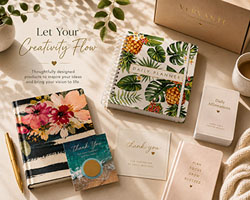
How to turn a planner into a collection
If you’re launching a daily planner for 2021 and like the idea of adding something more to make it stand out, how about turning it into a collection? Customers who love your planners will be excited when they see you have additional products available that add to the value of your planner. And you’ll love how easy it is to support the success of your planner while also adding to your revenue. Established planner companies like Erin Condren, Inkwell Press, and Dayspring know that people who love daily planners love to get extras to make them even more fun and valuable. You can do the same by creating and offering products such as: Stickers Booklets Journals of all sizes Bookmarks Note cards / stationery Recipe cards Printed newsletters or magazines Seasonal extras Desktop or tear-off calendars Adult coloring book Jars filled with small printed notes/note cards card deck / tarot cards Planners are very popular these days, but collections are what can give them some serious pizzazz! We are here to help you turn your planner into a complete collection with products and services you need. For more ideas, be sure to check out the Vervante Video Vault for videos that show ideas for products that can easily be bundled with daily planners. And for questions or to get started, email [email protected] or schedule a call with our CEO, Cindy, by clicking on this link.
Read More →