Blog Tag Archives: amazon
How to calculate your Amazon profits
If you have a book or product for sale via Amazon Marketplace - or planning on it for the future - and are unsure how to calculate how much profit you'll make on a sale, we've got you covered. As our customers are prepping for holiday launches for books and planners we've been hearing this question more often, prompting our CEO, Cindy Tyler, to create a video walking you through the process of identifying costs and calculating profits for your listings on Amazon Marketplace. Click here to access this special video with Cindy. In this video we cover: How to have Vervante set up your Amazon listing for you How to access our online retail transaction calculators Details of how Amazon fees work Estimating product and postage costs Calculating final profit amounts If you're curious to learn more about our services listing products on Amazon, the difference between using Vervante vs. KDP (Amazon's publishing services), or details and best practices when it comes to selling and shipping retail products, we invite you to visit our online library of free resources, including the following: Why Vervante vs. Amazon KDP Helpful Hints for Retail Distribution From Retail Sales to Royalties: How Authors Get Paid Bottom line? We want you to feel confident as you list, sell and ship your books and products and know that our team is here for you to help you along the way. For free production quotes, or to answer any other questions you might have, reach out to our team at Vervante customer service, we're here for you!
Read More →
How to set up and use Amazon Author Pages
If you’re looking for a secret weapon to support your Amazon sales, here it is – Amazon Author Pages! Authors who sell books on Amazon automatically have access to this very cool – and free – resource, but often don’t know they can use it, or forget about it with all the hustle and bustle of a sales launch. Amazon Author Pages help you to connect with your readers by providing detailed information about you, your books, and any other links or products you’d like to promote. There’s even a way for people to “Follow” you on Amazon so fans can be alerted when you debut new items. If you haven’t used this resource yet – or maybe set one up but forgot about it – it’s not too late. Here’s what you need to do: How to set up an Amazon Author Page Get started by going to Amazon Author Central and log in to your account. If this is the first time you're logging in to Author Central, follow their directions for verifying your account and linking to your existing books for sale on Amazon. Once you've done that, Amazon will walk you through the rest of the setup steps. Here are a few pro tips to make sure you are using this resource to its best: Amazon Profile: Start by uploading a current photo. Biography: Sharing your story helps readers make a stronger connection with you. Blogs: Link to your blog so updates will be posted on your Author Page as well. Photos & Videos: Upload event videos, book trailers, speaking highlights, interviews, etc. Once you’ve filled in all the information, check that all of your books are listed on your Author Page. If any of your books are not listed, go to the Books tab and click Add more books. To see how your Amazon Author Page looks to other people, click on the link provided in the Profile section. You'll also see a tab at the top called "Reports and Marketing," where you can: Use the Sales Rank feature to check how your book is performing in Amazon. Check Customer Reviews under the Reports + Marketing tab Want to see how other authors are using Amazon Author Pages? Here are a couple you can check out for inspiration: Melanie Beckler Judi Holler Amazon Author Pages are free to set up and a great opportunity you don’t want to miss. We hope this inspired you to get started on your own, and please let us know if you have any questions.
Read More →
How to add great photos to your Amazon listing
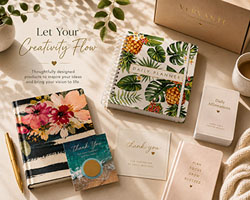
We're very excited to share with you today a new expert guides now available on our website Expert Guides page. It's free, easy to download and print, and we can't wait for you to see it. New Free Guide: Amazon Images & "Peek Inside" Feature This expert guide shares how to provide images for your listing, and how to add a popular feature that shoppers love. We can use single images of a book cover, or we can use designed images (like the one here with multiple products). We can also help you set up something similar to Amazon's popular "Look Inside" feature so customers can get a taste of the book or product you're offering for sale. We offer this service for both Amazon and Vervante Bookstore listings, called "Peek Inside." You're invited to check out our new guide, recently posted to the Expert Guides page on our website, for details. If you'd like to set this up for your listings in Amazon or the Vervante Bookstore, just following the easy direction in the user guide. And we'll be here at [email protected] if you need any help. You can view and download this guide, and many others, on our Expert Guides page on the website.
Read More →